

Hy-Memory
Collection
Hy-Memory model • 3 items • Updated • 4

Tencent Hunyuan



This repository provides GGUF quantizations of Hy-Memory-30B-A3B for efficient local inference with llama.cpp.
The releases use Tencent Hunyuan's Hy-Memory quantization recipe: imatrix calibration plus MoE-aware mixed precision. Routed experts, which dominate parameter count, can be compressed aggressively, while shared experts, attention, and input/output layers keep higher precision. On the same fixed Mem0 LoCoMo setup, even the ~8 GB expert-mixed build stays within about 1.5 points of the strongest Q6_K result (57.25% vs 58.78%), so the quality drop remains small while the file size falls to roughly one quarter of Q8_0.
| Quantization | File | Size | LoCoMo Judge |
|---|---|---|---|
| Q6_K imatrix | Hy-Memory-30B-A3B-Q6_K.gguf |
24.71 GB | 58.78% (154/262) |
| Q8_0 | Hy-Memory-30B-A3B-Q8_0.gguf |
31.99 GB | 57.63% (151/262) |
| Q3_K_M imatrix | Hy-Memory-30B-A3B-Q3_K_M.gguf |
14.45 GB | 57.25% (150/262) |
| Experts IQ1_M + rest Q8_0, imatrix | Hy-Memory-30B-A3B-Q8_0-expsIQ1_M.gguf |
8.03 GB | 57.25% (150/262) |
| Q4_K_M imatrix | Hy-Memory-30B-A3B-Q4_K_M.gguf |
18.24 GB | 56.49% (148/262) |
| Experts IQ2_XXS + rest Q8_0, imatrix | Hy-Memory-30B-A3B-Q8_0-expsIQ2_XXS.gguf |
9.14 GB | 55.73% (146/262) |
All six files passed llama.cpp --check-tensors, real no-think generation, and the complete fixed 20% Mem0 LoCoMo evaluation. Each version builds its own memory bank under identical settings. These are single-run scores: they do not claim lossless quantization, and lower-bit variants are not guaranteed to beat higher-bit ones.
The recipe focuses on two design choices:
Encoding formats come from the open-source llama.cpp ecosystem (Q3_K_M, Q4_K_M, Q6_K, Q8_0, IQ1_M, IQ2_XXS). What this repository publishes is the Hy-Memory calibration and precision-allocation recipe on top of those formats. Five files use an importance matrix; Q8_0 is the standard 8-bit baseline without imatrix.
| Spec | How weights are compressed | How to read it |
|---|---|---|
Q3_K_M |
Mostly 3-bit K-quants, with some tensors kept at higher precision | Compact 3-bit mixed recipe; not every weight is exactly 3 bits |
Q4_K_M |
Mostly 4-bit K-quants, with some tensors kept at higher precision | Mid-tier 4-bit recipe; M means Medium in that family |
Q6_K |
Mostly 6-bit K-quants | Higher bit-width and larger file than Q3/Q4 |
Q8_0 |
Main matrices use 8-bit weights with group scales | Higher-precision integer quantization; not FP8 |
Q8_0-expsIQ1_M |
Routed experts use IQ1_M; remaining main matrices use Q8_0 | Smallest fully evaluated release in this repo (~8.03 GB) |
Q8_0-expsIQ2_XXS |
Routed experts use IQ2_XXS; remaining main matrices use Q8_0 | Expert encoding uses more bits than IQ1_M (~9.14 GB) |
Naming notes:
I is a letter, not the digit 1; these are not aliases of Q1_0 / Q2_0.File size still includes scales, floating-point leftovers, and metadata. Runtime VRAM also includes KV cache and framework overhead, so it is not equal to the download size.
Verified against GGUF tensor types:
| Model part | Q8_0-expsIQ1_M |
Q8_0-expsIQ2_XXS |
|---|---|---|
| Routed experts selected by the router | IQ1_M | IQ2_XXS |
| Shared experts | Q8_0 | Q8_0 |
| Attention projections | Q8_0 | Q8_0 |
| Token embedding and output layer | Q8_0 | Q8_0 |
| Router, norms, and other small float tensors | F32 | F32 |
Each mixed file has 141 routed-expert tensors in the corresponding IQ type, 338 other matrix tensors in Q8_0, and 287 tensors kept in F32. “Low-bit experts + Q8_0 elsewhere” is a precision allocation, not a 1-bit / 2-bit whole-model compress, and not expert pruning.
Some community ultra-low-bit GGUF files can load successfully but fail memory writing: garbled text, endless repetition, or broken JSON. A Q1 / Q2 filename or a successful server start is not enough evidence that the model works.
On 2026-10-21 we checked vinnipukh/Hy-Memory-30B-A3B-GGUF at commit aa6b91554c36e108fe4463a20b5a8eac9121410f with matching SHA256 downloads, llama.cpp 5aeac37a35b44fde4bdffaec9159f2fcb253b622, H20, no-think, F16 KV, and no forced JSON decoding:
| Community file | Loads | Valid JSON on 8 basic memory prompts | Observed output |
|---|---|---|---|
Q1_0 |
Yes | 0/8 | Irrelevant word loops until the output limit |
Q2_0 |
Yes | 0/8 | Mixed characters / words and repetition |
TQ1_0 |
Yes | 0/8 | Non-sentence content and repetition |
TQ2_0 |
Yes | 0/8 | Non-sentence content and repetition |
The check covered Chinese/English extract, update, delete, and fact-source prompts (temperature=0, max_tokens=256). All four community responses hit the token limit. Under the same prompts, local Q6_K returned valid JSON in all 8 trials. This is a basic output check, not a LoCoMo Judge score, and it does not isolate quantization error vs conversion vs backend issues. The conclusion applies only to the files and setup above.
By contrast, this repository's Q8_0-expsIQ1_M and Q8_0-expsIQ2_XXS use different IQ encodings, compress only routed experts to those low bit-widths, and have passed both structured-output checks and the full fixed 20% Mem0 LoCoMo pipeline. Distinguish releases by the full filename.
top_k=10, 10 turns per memory chunkqwen3-embedding-8b-for-online (4096 dimensions)gpt-5.6-sol5aeac37a35b44fde4bdffaec9159f2fcb253b622All six releases completed 59 memory-chunk writes and 262 judged answers with no leftover evaluation errors. This directory does not include the BF16 Hugging Face weights.
| File | SHA256 |
|---|---|
Hy-Memory-30B-A3B-Q3_K_M.gguf |
26df98e88117fb2a32c083e2ca95dae169e3de263989a100be169f613db21dd3 |
Hy-Memory-30B-A3B-Q8_0-expsIQ1_M.gguf |
49288904a31654efb57b1b113e36009c17852f7e665d05cbe1c0dd36d96e0f55 |
Hy-Memory-30B-A3B-Q8_0-expsIQ2_XXS.gguf |
d53dc44baf8e64a0ef58344e9c1550acb0999234f44966284f593b0a27c081e9 |
Hy-Memory-30B-A3B-Q8_0.gguf |
3ba2897dbb7e21e618cb65cec4b31498e59eca2960b381c5e0a0590e7ce8526b |
Hy-Memory-30B-A3B is a compact long-term-memory writer model (~3B active parameters) developed by Tencent Hunyuan to execute the write path inside external memory frameworks. It directly replaces the general-purpose LLM inside Mem0, MemOS, and Hy-Memory (covering Chat, Working, and Coding scenarios), deciding what information to retain, how precisely to represent it, and how new evidence should update the persistent memory bank. The model is trained in two stages—Memory On-Policy Distillation (OPD) followed by Attributed Memory Reinforcement Learning—and transfers directly to unseen memory frameworks such as EverMemOS.
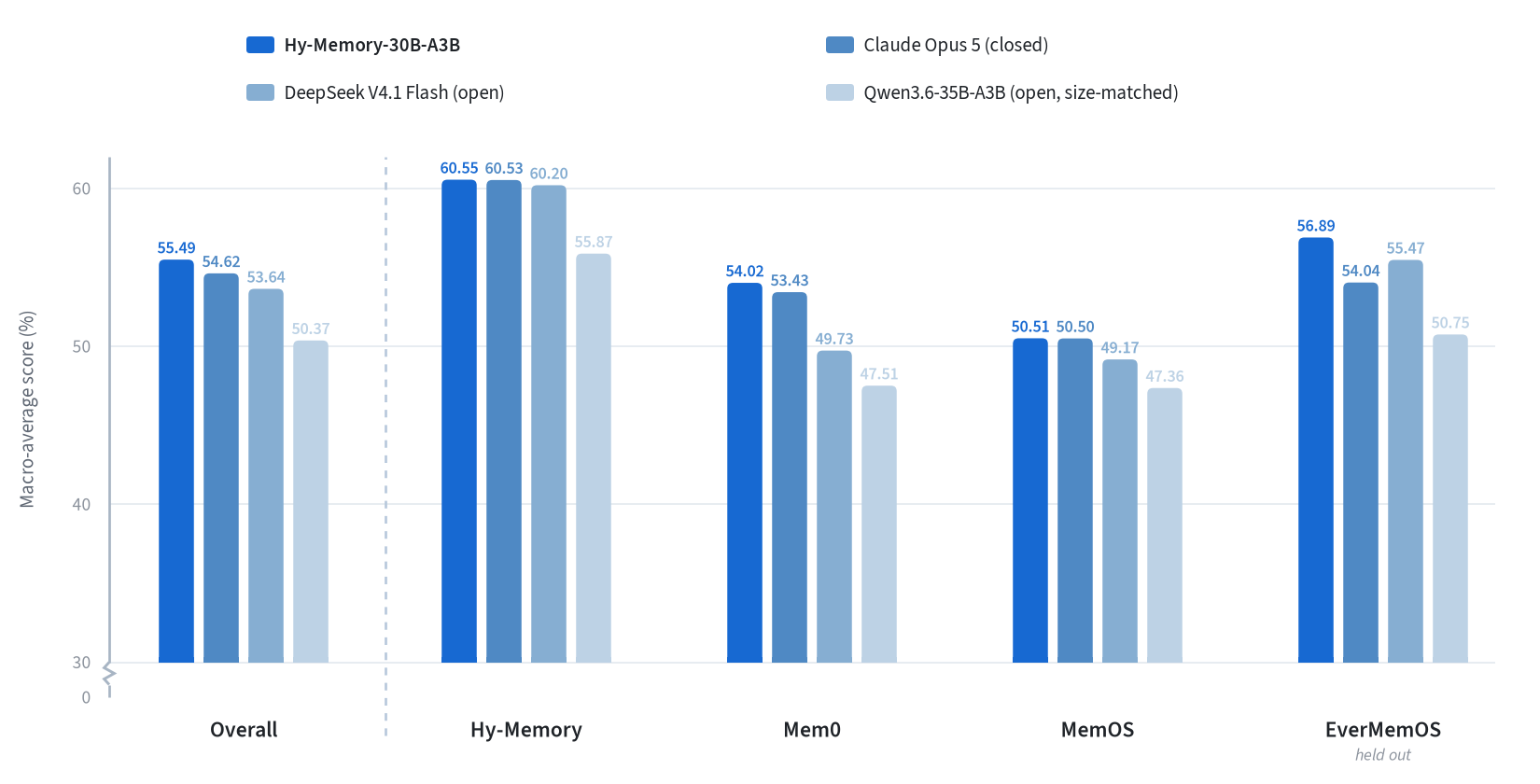
Cross-harness macro-average scores on the fixed 20% benchmark matrix. Each harness score averages six metrics equally; Overall averages the four harnesses equally. EverMemOS is held out from training.

Figure 1: Hy-Memory-30B-A3B is trained inside the same deployed harness configurations in both stages. OPD supplies dense teacher supervision on student-written state chains; RL examines the resulting banks, assigns chunk-level credit, and carries the selected bank across windows. In the rollout grid, each cell is the bank after chunk t of rollout i, shaded by its chunk score s_i[t]. Advantages are normalized within each column (dashed: one chunk-level group), so the best rollout can differ from chunk to chunk. The outlined cell is the final bank with the highest sum_t s_i[t], which becomes the parent of the next window.
The full cross-harness results below are reproduced from the original Hy-Memory-30B-A3B model card. GGUF-specific measurements are reported in the GGUF Quantization section above.
The evaluation changes only the memory writer. For each comparison, the harness version and prompts are fixed, retrieval configuration is fixed, and the answer model, judge, and other framework-side components are held fixed. Throughout this report, every reference to a DeepSeek Flash endpoint denotes DeepSeek V4.1 Flash. Decoding settings are matched where APIs permit, each writer builds its own bank from an empty state, and test examples and scoring rules are identical.
For computational efficiency, every benchmark in the main four-harness matrix is evaluated on a fixed 20% subsample. Each harness score is the equal-weight average of six metrics: LoCoMo Judge, LongMemEval (LME), PersonaMem-v2 (PM-v2), Travel SPS, Shopping PS, and Code Memory Bench (CMB). CMB is itself the equal-weight average of two repository QA evaluations. The overall score is the equal-weight average of the four harness scores.
| Memory writer | Mem0 | Hy-Mem. | MemOS | EverMem. | Avg. |
|---|---|---|---|---|---|
| Hy-Memory-30B-A3B | 54.02 | 60.55 | 50.51 | 56.89 | 55.49 |
| Claude Opus 5 | 53.43 | 60.53 | 50.50 | 54.04 | 54.62 |
| DeepSeek V4.1 Flash | 49.73 | 60.20 | 49.17 | 55.47 | 53.64 |
| Hy3 | 45.99 | 58.06 | 50.19 | 52.30 | 51.63 |
| Qwen3.6-35B-A3B | 47.51 | 55.87 | 47.36 | 50.75 | 50.37 |
| Hy3-A3B Base | 40.20 | 50.39 | 49.05 | 50.98 | 47.66 |
| Qwen3-30B-A3B | 39.81 | 45.67 | 45.44 | 46.57 | 44.37 |
Table 1: Six-metric means on fixed 20% benchmark subsamples. The macro average weights the four harnesses equally.
Tables 2–5 report the six benchmark scores used to compute each harness mean in Table 1 on the same fixed 20% benchmark subsamples.
| Writer | LoCoMo | LME | PM-v2 | Travel | Shop. | CMB | Avg. |
|---|---|---|---|---|---|---|---|
| Hy-Memory-30B-A3B | 59.54 | 73.00 | 51.62 | 54.51 | 18.33 | 67.13 | 54.02 |
| Claude Opus 5 | 69.47 | 66.00 | 53.58 | 42.98 | 17.78 | 70.74 | 53.43 |
| DeepSeek V4.1 Flash | 58.78 | 69.39 | 49.56 | 35.07 | 16.67 | 68.92 | 49.73 |
| Hy3 | 41.22 | 62.00 | 44.44 | 46.87 | 17.22 | 64.16 | 45.99 |
| Qwen3.6-35B-A3B | 50.00 | 69.00 | 49.38 | 36.39 | 20.00 | 60.30 | 47.51 |
| Hy3-A3B Base | 50.00 | 47.00 | 40.82 | 37.91 | 14.44 | 51.03 | 40.20 |
| Qwen3-30B-A3B | 46.18 | 56.00 | 42.32 | 31.98 | 16.67 | 45.68 | 39.81 |
| Writer | LoCoMo | LME | PM-v2 | Travel | Shop. | CMB | Avg. |
|---|---|---|---|---|---|---|---|
| Hy-Memory-30B-A3B | 73.28 | 89.00 | 51.54 | 57.65 | 21.11 | 70.73 | 60.55 |
| Claude Opus 5 | 74.43 | 89.69 | 48.71 | 51.34 | 23.33 | 75.70 | 60.53 |
| DeepSeek V4.1 Flash | 72.90 | 85.86 | 49.00 | 53.46 | 22.78 | 77.18 | 60.20 |
| Hy3 | 69.47 | 89.00 | 52.76 | 49.01 | 21.67 | 66.44 | 58.06 |
| Qwen3.6-35B-A3B | 70.99 | 84.85 | 43.56 | 49.82 | 20.00 | 65.98 | 55.87 |
| Hy3-A3B Base | 66.41 | 87.00 | 49.84 | 31.36 | 17.78 | 49.97 | 50.39 |
| Qwen3-30B-A3B | 64.12 | 82.00 | 41.06 | 32.83 | 18.89 | 35.10 | 45.67 |
| Writer | LoCoMo | LME | PM-v2 | Travel | Shop. | CMB | Avg. |
|---|---|---|---|---|---|---|---|
| Hy-Memory-30B-A3B | 62.98 | 73.00 | 51.92 | 24.15 | 21.11 | 69.91 | 50.51 |
| Claude Opus 5 | 63.74 | 79.38 | 52.84 | 22.14 | 19.44 | 65.46 | 50.50 |
| DeepSeek V4.1 Flash | 61.07 | 73.00 | 50.68 | 18.61 | 21.67 | 69.97 | 49.17 |
| Hy3 | 62.98 | 81.00 | 49.64 | 18.87 | 18.89 | 69.78 | 50.19 |
| Qwen3.6-35B-A3B | 55.34 | 79.00 | 51.34 | 20.08 | 15.56 | 62.82 | 47.36 |
| Hy3-A3B Base | 58.40 | 73.00 | 50.86 | 26.05 | 21.11 | 64.88 | 49.05 |
| Qwen3-30B-A3B | 59.16 | 73.00 | 48.28 | 23.03 | 16.67 | 52.49 | 45.44 |
| Writer | LoCoMo | LME | PM-v2 | Travel | Shop. | CMB | Avg. |
|---|---|---|---|---|---|---|---|
| Hy-Memory-30B-A3B | 73.28 | 76.00 | 53.28 | 56.56 | 19.05 | 63.19 | 56.89 |
| Claude Opus 5 | 73.28 | 80.41 | 51.19 | 45.91 | 23.89 | 49.53 | 54.04 |
| DeepSeek V4.1 Flash | 72.52 | 82.83 | 49.74 | 59.47 | 18.89 | 49.38 | 55.47 |
| Hy3 | 68.70 | 83.00 | 48.68 | 46.52 | 19.44 | 47.44 | 52.30 |
| Qwen3.6-35B-A3B | 69.08 | 79.00 | 50.60 | 43.53 | 18.77 | 43.52 | 50.75 |
| Hy3-A3B Base | 64.50 | 81.00 | 52.14 | 41.74 | 20.56 | 45.93 | 50.98 |
| Qwen3-30B-A3B | 67.94 | 60.00 | 47.10 | 44.80 | 18.33 | 41.27 | 46.57 |
We recommend using a recent official llama.cpp build. The commands below were validated with llama.cpp commit 5aeac37a35b44fde4bdffaec9159f2fcb253b622 and the Q6_K imatrix model.
The example uses Q6_K. For another release, change --model to the corresponding filename and keep --alias / the request model field consistent; keep the same no-think settings.
llama-server \
  --model ./Hy-Memory-30B-A3B-Q6_K.gguf \
  --alias Hy-Memory-30B-A3B-Q6_K \
  --host 127.0.0.1 \
  --port 8000 \
  --n-gpu-layers all \
  --flash-attn on \
  --ctx-size 65536 \
  --parallel 1 \
  --batch-size 2048 \
  --ubatch-size 512 \
  --cache-type-k f16 \
  --cache-type-v f16 \
  --temp 0.7 \
  --top-k 0 \
  --top-p 1.0 \
  --repeat-penalty 1.0 \
  --jinja \
  --chat-template-kwargs '{"reasoning_effort":"no_think"}' \
  --check-tensors
--ctx-size is the total context available to the server. The single-slot configuration above provides a 64K context window. If you use --parallel 2 to provide two slots, set --ctx-size 131072 to retain up to 64K context per request.
from openai import OpenAI

client = OpenAI(
    base_url="http://127.0.0.1:8000/v1",
    api_key="EMPTY",
)

response = client.chat.completions.create(
    model="Hy-Memory-30B-A3B-Q6_K",
    messages=[
        {
            "role": "user",
            "content": (
                "Extract the durable memory from the following conversation and "
                "return only one concise sentence:\n\n"
                "User: I moved from Boston to Seattle in March 2025, and my "
                "preferred contact method is email."
            ),
        }
    ],
    temperature=0.7,
    top_p=1.0,
    max_tokens=512,
    extra_body={"reasoning_effort": "no_think"},
)

print(response.choices[0].message.content)
curl http://127.0.0.1:8000/v1/chat/completions \
  -H 'Content-Type: application/json' \
  -d '{
    "model": "Hy-Memory-30B-A3B-Q6_K",
    "messages": [
      {
        "role": "user",
        "content": "Extract the durable memory and return only one concise sentence: User: I moved from Boston to Seattle in March 2025, and my preferred contact method is email."
      }
    ],
    "temperature": 0.7,
    "top_p": 1.0,
    "max_tokens": 512,
    "reasoning_effort": "no_think"
  }'
The server-level --chat-template-kwargs enables no-think mode by default. Setting reasoning_effort=no_think in each request makes the behavior explicit and easier to audit.
1-bit
2-bit
3-bit
4-bit
6-bit
8-bit
Base model
tencent/Hy-Memory-30B-A3B